Commercial License Activation All Editions
Activating your commercial license key registers your store installation with the FlexExt authorization network, validates your license tier (Basic, Pro, or Ultimate), and unlocks commercial capabilities such as payment gateways, PDF invoice generation, and unlimited variant matrixes.
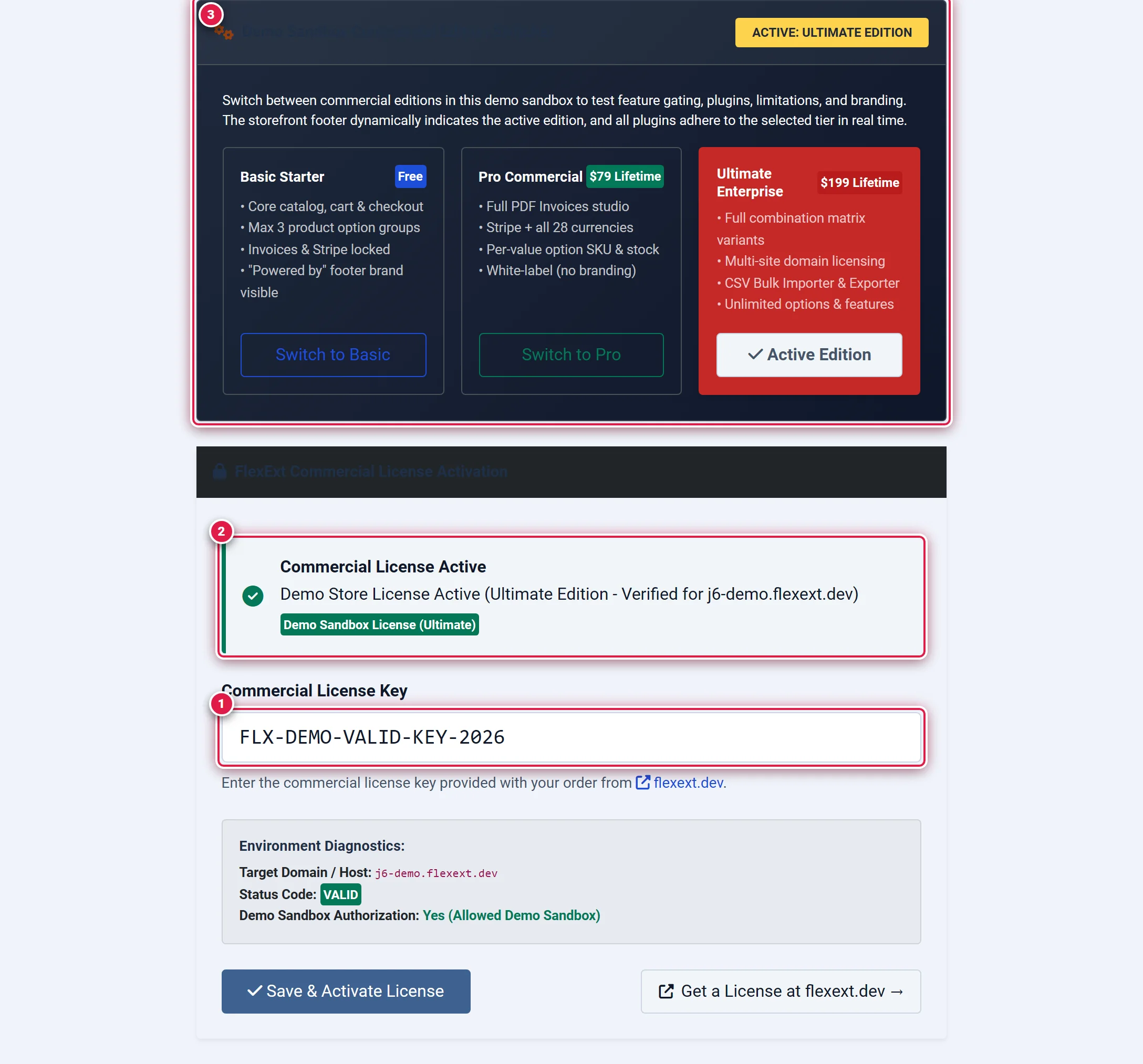
- Badge 1 — Commercial License Key Input: Location to enter your purchased retail license key (
FLX-XXXX-XXXX-XXXX-XXXX). - Badge 2 — Active License Status Banner: Displays confirmation of cryptographic Ed25519 signature verification and active tier.
- Badge 3 — Demo Sandbox Edition Switcher: On demo hosts, allows simulating Basic Starter, Pro Commercial, and Ultimate Enterprise tiers.
Before you start
- Obtain Your Key: Have your commercial license key ready from your order receipt at flexext.dev/account/downloads. License keys follow the 20-character format:
FLX-ABCD-1234-EFGH-5678
- PHP Sodium Extension: Ensure
ext-sodiumis enabled in your PHP runtime (standard in PHP 7.2+). - Outbound HTTPS: Your server must be able to resolve and connect to
https://flexext.dev/api/license.php.
Where to find it
Navigate to the activation screen in your Joomla Administrator:
Components → FlexExt Store → License & Activation
Direct URL: administrator/index.php?option=com_flexext_store&view=license
Step-by-Step Activation
Locate the Commercial License Key Input (Badge 1)
On the License & Activation screen, locate the FlexExt Commercial License Activation card. The input field is labeled Commercial License Key (Badge 1).
Paste Your Commercial Key & Click Save & Activate
Carefully copy and paste your 20-character license key into the input field. Do not include extra whitespace or quotation marks. Click the blue Save & Activate License button.
The system performs a secure handshake:
- Collects the canonical host domain (
Uri::getInstance()->getHost()). - Sends a cryptographic authorization request to
https://flexext.dev/api/license.php. - Verifies the returned detached Ed25519 signature using
sodium_crypto_sign_verify_detached. - Stores the cryptographically signed license token locally in your Joomla database.
Verify Active Status (Badge 2)
You should immediately see:
- A green alert banner: Commercial License Active — Full functionality unlocked (Badge 2).
- The authorized edition badge (e.g.
Pro CommercialorUltimate Enterprise). - Diagnostics confirming valid cryptographic status.
Understanding License Tiers
Your activated license key unlocks features based on your purchased tier:
- Basic Starter ($0 Free): Includes core catalog management, single-page cart and checkout, max 3 option groups per product, and 2 currencies.
- Standard Commercial ($39): Unlocks unlimited product options, 3 currencies (PLN, EUR, USD), up to 5 custom tabs, 15 FAQ items, 25 tooltips, and 100% white-label (removes "Powered by" branding).
- Pro Commercial ($79): Unlocks the dedicated Store Pro Template ($39 gift included), automated PDF Invoices & packing slips, Stripe payment gateway, all 28 currencies, 5 sales boosters (Order Bump, FBT, Exit-Intent), and Excel Bulk Manager Pro.
- Ultimate Enterprise ($199): Bundles the entire software suite 100% free (Store Pro Template + Mega Menu Studio Pro + Visual Slideshow Studio Pro + Demo Reset Engine), multi-domain licensing (up to 3 domains), full Variants Matrix Studio, Google Merchant XML feed, and multi-vendor/multi-warehouse logistics.
For a comprehensive feature-by-feature breakdown, see the Commercial Edition Matrix.
Strict License Lock Enforcement
In accordance with Antigravity Rule 7, when an installation is unlicensed or when an invalid key is supplied, the entire store enters Strict License Lock mode:
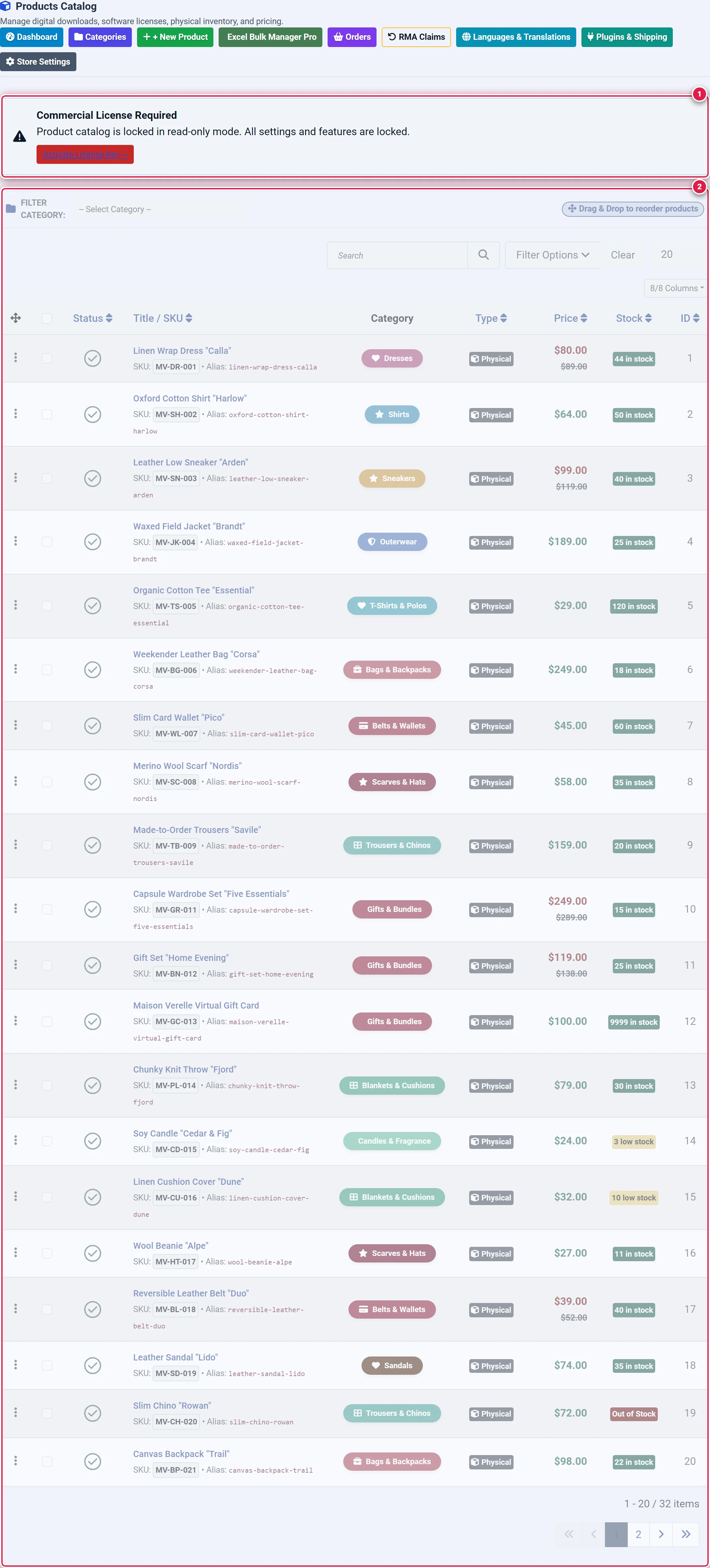
- Badge 1 — Strict License Lock Alert Banner: Critical notification explaining that management is locked in read-only trial mode.
- Badge 2 — Disabled Form Controls & Safeguards: Fieldsets across all configuration forms are disabled with pointer-events blocked.
- Admin Form Disabling: All catalog editors, settings forms, and order actions are wrapped in disabled
<fieldset>tags with grayscaled opacity, preventing accidental data loss or partial writes. - Storefront Safeguard: Storefront purchase workflows are halted until a valid commercial key is supplied.
- Immediate Resolution: Entering and activating a valid commercial key instantly clears all locks across the admin and storefront without requiring a page reload or system restart.
Tips & Best Practices
Once your key is verified, FlexExt Store caches the signed cryptographic token in the database. If your web host experiences temporary network outages or if the license server undergoes maintenance, your store remains 100% operational for up to 14 days without interruption.
Development installations running on localhost, 127.0.0.1, or official FlexExt demo sandboxes do not consume production domain activations.
Troubleshooting
"Invalid or simulated test license key rejected"
Ensure you copied the entire key string without leading or trailing spaces. Keys with test strings (like TEST or SAMPLE) are rejected.
"Unable to connect to FlexExt License Server"
If you receive a network error, check your server's firewall configuration to ensure outbound TCP port 443 connections to flexext.dev are allowed.