Tab 9: Product FAQ Studio Pro
The Product FAQ Studio Pro tab (#product_faq) integrates customer support intelligence directly onto product pages. It allows store managers to create interactive accordion Q&As, import global questions from com_flexext_faq, and automatically inject Schema.org FAQPage microdata for rich search engine snippets.
1. Overview
From the Product FAQ Studio Pro tab, store administrators configure:
- Product-Specific Q&A Pairs: Author unique questions and comprehensive answers specific to that item.
- Global FAQ Integration: Link pre-authored questions from global FAQ categories managed in
com_flexext_faq. - Accordion Order Sequence: Reorder questions to place the most frequent customer inquiries at the top.
- Search Engine Rich Snippets: Automatically generates Google-compliant
FAQPageJSON-LD schema. - Edition Capacities:
- Basic Starter: 0 FAQ Items (Feature locked) .
- Standard Commercial: Up to 15 FAQ items per product (Unlocked at $39).
- Pro Commercial: Up to 50 FAQ items per product .
- Ultimate Enterprise: Unlimited FAQ items .
2. Before You Start
- Edition Verification: Product FAQ requires Standard Commercial, Pro Commercial, or Ultimate Enterprise. On Basic Starter, this tab displays an upgrade notification.
- Global FAQs (Optional): If you maintain global questions (e.g. shipping timeframes, return policies), configure them in
Components ➔ FlexExt FAQ.
3. Where to Find It
- Open the Product Editor (
index.php?option=com_flexext_store&view=product&layout=edit&id=1). - Click the ninth tab in the navigation bar: Product FAQ Studio Pro (
#product_faq-tab).
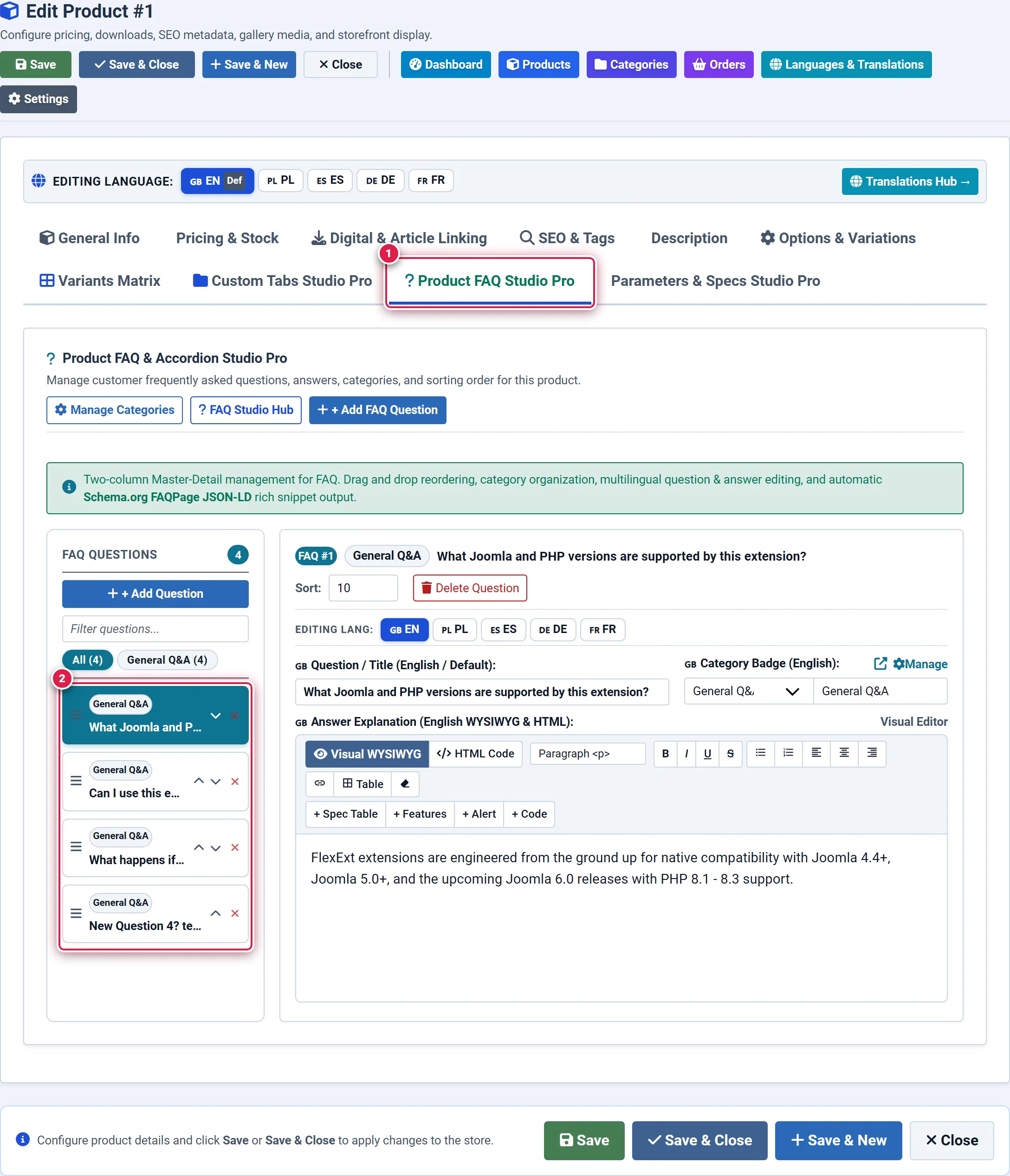
- Badge 1 — Product FAQ Studio Tab: Activates the product-specific accordion Q&A workspace.
- Badge 2 — + Add FAQ Item Action: Expands a new interactive question and answer editing card.
- Badge 3 — Q&A Accordion Item Card: Edits question title, rich answer body, and sort position for storefront display.
4. Step-by-Step Configuration
Adding a Custom Question
Click the blue + Add FAQ Item button. You should see: A new accordion builder card expands.
Writing Question and Answer
In the Question field, type the inquiry as a customer would phrase it (e.g., "Is this chair suitable for someone over 6 feet tall?"). In the Answer textarea, provide the detailed response. You should see: Character count and formatting preview update in real-time.
Linking Global FAQs (Optional)
If global questions exist in com_flexext_faq, click + Import Global FAQ. Select the question category (e.g., Shipping & Delivery) and check the questions you want attached.
You should see: The selected global questions link to this product without duplicating database records.
Ordering and Saving
Drag the questions into optimal order using the move handles, then click Save in the top action bar. You should see: The questions publish to the storefront in an interactive accordion container.
5. Field Reference
| Field | Description | Default | Notes & Limits | Edition |
|---|---|---|---|---|
| Question | Customer inquiry header | Required | Formatted in prominent bold text | Pro / Ultimate |
| Answer | Comprehensive response text | Required | Supports rich text and links | Pro / Ultimate |
| Source | Origin (custom or com_flexext_faq) | custom | Global items stay synchronized | Pro / Ultimate |
| Ordering | Display sequence in accordion | 0 | Lower numbers display higher | Pro / Ultimate |
| Published | Visibility toggle switch | Yes (1) | Temporarily hide individual Q&As | Pro / Ultimate |
| FAQ Limit | Maximum FAQ items per product | 50 in Pro | Unlimited in Ultimate | Pro: 50 / Ultimate: ∞ |
6. Storefront Result & SEO Microdata
On the storefront product page:
- Questions display as sleek accordion rows that expand smoothly with micro-animations when clicked.
- Search engines ingest the automated JSON-LD
FAQPageschema, enabling collapsible Q&A rich snippets directly inside Google search result cards. - Customer support ticket volume is reduced by resolving pre-purchase objections directly on the page.
7. Tips & Best Practices
Write questions from the customer's perspective (e.g. "Can I wash this in a washing machine?" rather than "Washing instructions"). Natural queries match voice search algorithms more effectively.
For policies that apply to every product (such as return windows or payment methods), author them once in global com_flexext_faq and link them to products, rather than manually typing them into each product.
8. Troubleshooting
| Symptom | Probable Cause | Recommended Resolution |
|---|---|---|
| Product FAQ tab shows "Commercial License Required" | Store is running on Basic Starter tier | Upgrade to Pro Commercial or Ultimate Enterprise to unlock Product FAQ Studio. |
| Google search does not display FAQ rich snippet | Schema has not been re-crawled yet or site has low domain authority | Test your product URL using Google's Rich Results Test tool to verify valid FAQPage JSON-LD schema. |
| Global FAQ questions do not appear in import modal | com_flexext_faq has no published questions | Open Components → FlexExt FAQ and ensure questions are published with status 1. |
9. Related Documentation
- Tab 8: Custom Tabs Studio Pro: Add custom non-accordion rich text tabs.
- Tab 5: Description & Content: Primary product marketing body.
- Product FAQ Plugin: Global styling and accordion animation options.