License Hub & Edition Management All Editions
The FlexExt Commercial License Hub validates store authorization, unlocks edition-specific capabilities (Basic, Pro, Ultimate), and provides environment diagnostics. FlexExt Store employs cryptographic signature validation (Ed25519) to ensure secure, tamper-proof license management.
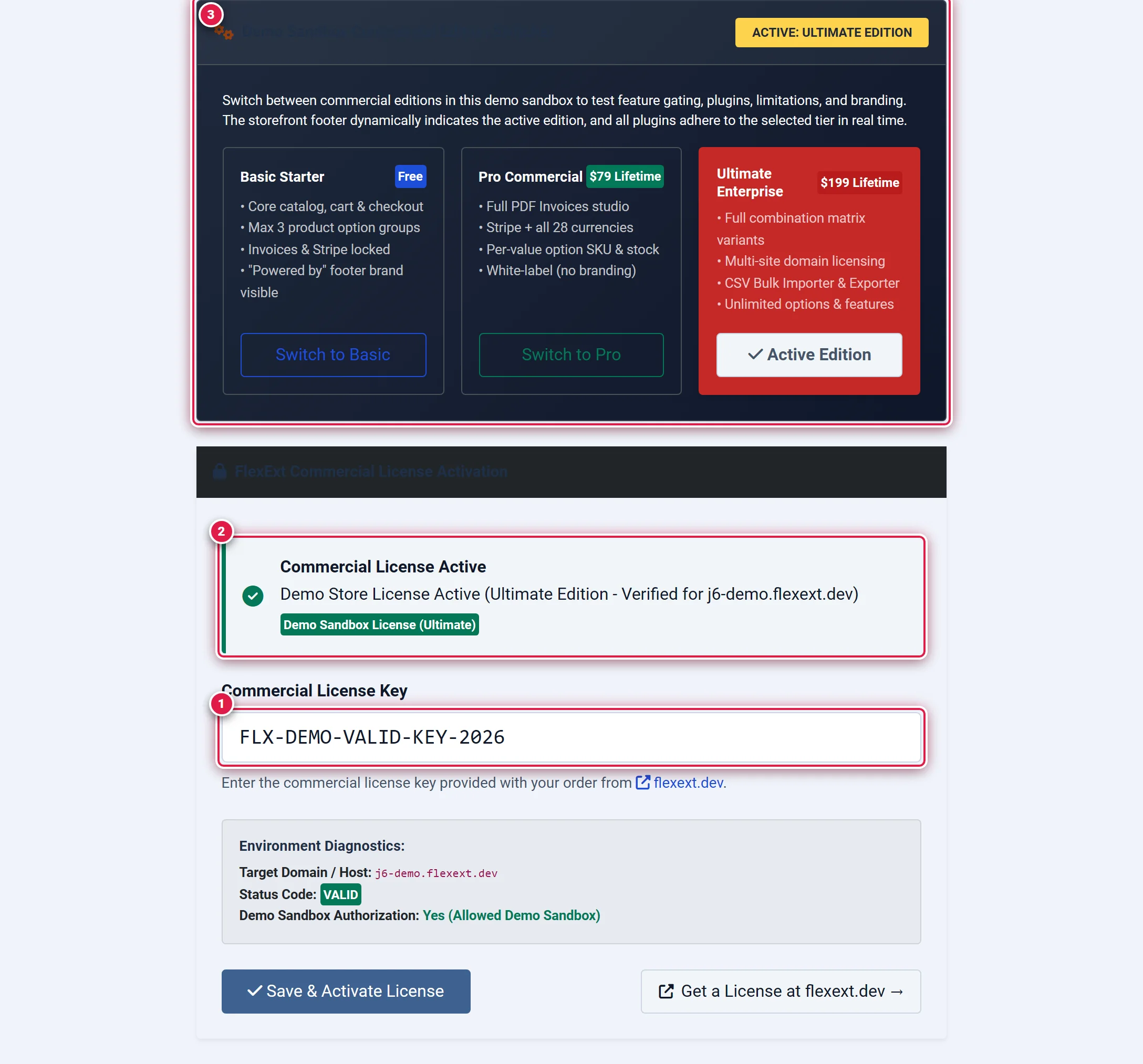
- Badge 1 — Commercial License Key Input: Enter your 20-character license key (
FLX-XXXX-XXXX-XXXX-XXXX) and click Save & Activate License. - Badge 2 — Active License Status Banner: Displays confirmation of cryptographic Ed25519 signature verification, authorized tier, and licensed host.
- Badge 3 — Demo Sandbox Commercial Edition Switcher: On demo sandboxes, switch freely between Basic Starter, Pro Commercial, and Ultimate Enterprise modes.
Before you start
- Commercial License Key: You will receive an authentic commercial key (format
FLX-XXXX-XXXX-XXXX-XXXX) upon completing an order at flexext.dev. - PHP Sodium Extension: License signature validation requires the standard PHP
sodiumextension (ext-sodium, available in PHP 7.2+). - Outbound HTTPS: The server must allow outbound HTTPS connections to
https://flexext.dev/api/license.phpduring key activation. Once validated, offline operations continue uninterrupted via local cryptographic token caching.
Where to find it
Access the license hub from the Joomla Administrator:
Components → FlexExt Store → License & Activation
Direct URL: administrator/index.php?option=com_flexext_store&view=license
Commercial Edition Tiers
FlexExt Store is available in four distinct commercial tiers. Feature availability throughout the administration panel and storefront adapts automatically to your active tier:
| Feature / Capability | Basic Starter ($0) | Standard Commercial ($39) | Pro Commercial ($79) | Ultimate Enterprise ($199) |
|---|---|---|---|---|
| Catalog & Products | Yes (Unlimited) | Yes (Unlimited) | Yes (Unlimited) | Yes (Unlimited) |
| Cart & Single-Page Checkout | Yes | Yes | Yes | Yes |
| Product Option Groups Limit | Max 3 groups | Unlimited | Unlimited | Unlimited |
| Currencies Supported | 2 Currencies | 3 Currencies | All 28 Currencies | All 28 Currencies |
| Active Coupons | — | Up to 5 Coupons | Unlimited | Unlimited + BOGO Rules |
| Option Value SKU & Stock | — | — | Yes | Yes |
| PDF Invoices & Packing Slips | — | — | Yes (Vector QR) | Yes + Automated Emailing |
| Stripe Payment Gateway | — | — | Yes | Yes |
| Sales Boosters Suite | — | Discount Badges | Full Suite (5 Boosters) | Full Suite (5 Boosters) |
| Excel Bulk Manager Pro | — | — | Yes | Yes |
| Variants Matrix Studio | — | — | — | Yes |
| Multi-Domain Commercial License | 1 Domain | 1 Domain | 1 Domain | Up to 3 Domains |
| Dedicated Store Pro Template | Optional ($39) | Optional ($39) | FREE ($39 Gift Included) | FREE ($39 Value Bundled) |
| Mega Menu & Slideshow Studio | Optional Add-ons | Optional Add-ons | Optional Add-ons | FREE ($68 Value Bundled) |
| White-Label (Remove Brand) | — | Yes | Yes | Yes |
Activating a Commercial License Key
Obtain Your License Key
Log in to your customer dashboard at flexext.dev or retrieve the key from your purchase confirmation email. Your key will have the format:
FLX-ABCD-1234-EFGH-5678
Enter the Key in the License Hub (Badge 1)
Navigate to Components → FlexExt Store → License & Activation. Scroll to the Commercial License Key input field (Badge 1) and paste your key.
Save & Activate (Badge 2)
Click Save & Activate License. The system transmits a cryptographically signed authorization request to flexext.dev. Upon approval, a signed Ed25519 token is stored in your database.
You should see:
- A prominent green alert banner: Commercial License Active (Badge 2).
- Your authorized edition displayed in the header badge.
- All admin management screens and storefront features instantly unlocked.
Demo Sandbox Edition Switcher (Badge 3)
When running on an authorized demo or development host (such as j6-demo.flexext.dev or localhost), the License Hub provides an interactive Demo Sandbox Commercial Edition Switcher (Badge 3):
- Switch to Basic: Simulates the starter edition. Locks PDF Invoices, restricts options to 3 groups, and activates "Powered by FlexExt" storefront branding.
- Switch to Pro: Unlocks Stripe, PDF Invoices, 28 currencies, and removes storefront branding.
- Switch to Ultimate: Unlocks the Variants Matrix Studio, Excel Bulk Manager Pro, and advanced bulk import tools.
The demo edition switcher sets a signed, per-visitor HTTP cookie (flx_demo_edition). Switching editions alters only your personal browser session without affecting other visitors or modifying the global server database.
Strict License Lock Enforcement
In accordance with Antigravity Rule 7, when an extension operates without a valid license key or when an invalid/expired key is entered, Strict License Lock is automatically enforced across the entire system.
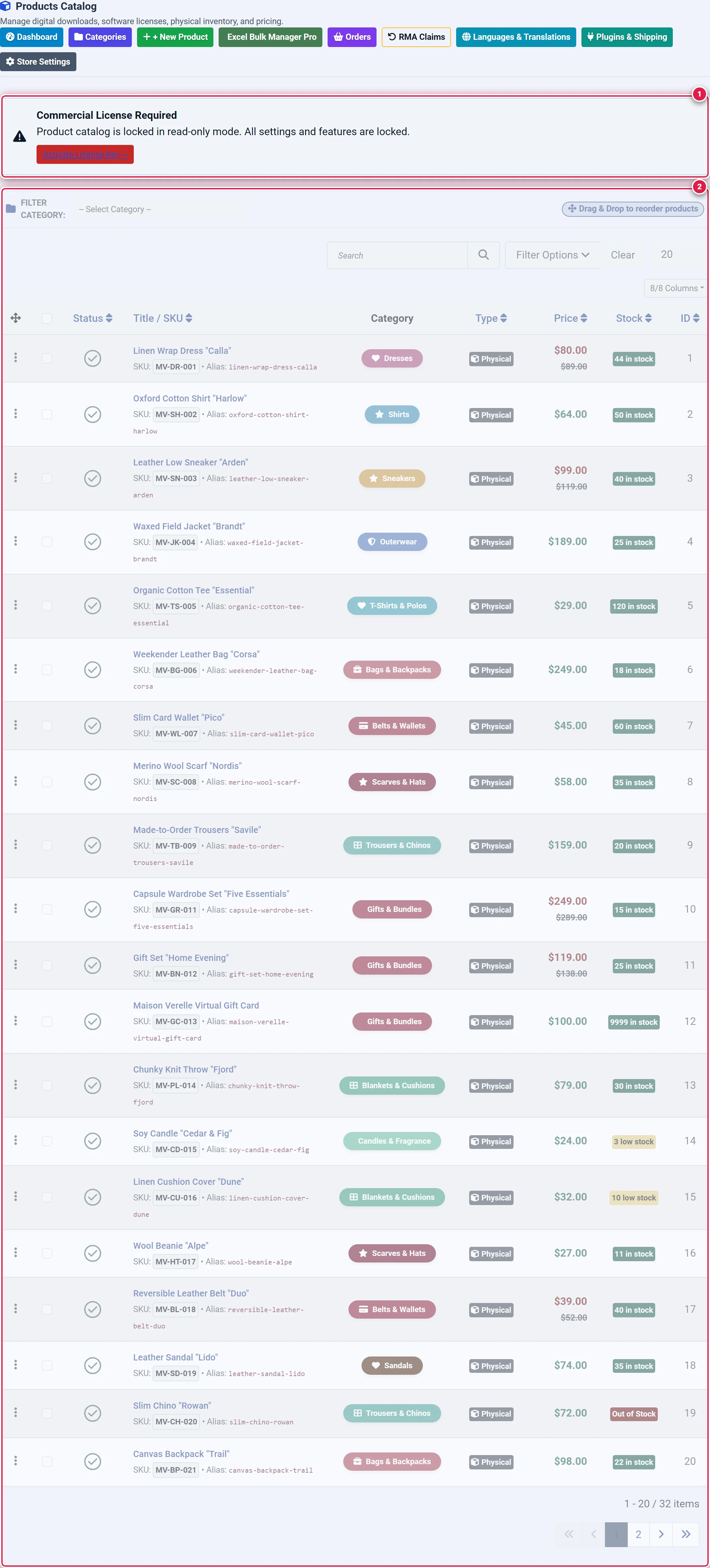
- Badge 1 — Strict License Lock Alert Banner: Alerts administrators that store management is operating in read-only mode and requires a commercial key.
- Badge 2 — Disabled Form Controls & Safeguards: All inputs, toggles, and buttons are wrapped in disabled fieldsets with 50% opacity and blocked pointer interactions.
What Happens Under Strict License Lock?
-
Administrator UI:
- A critical red banner displays across all views:
Commercial License Required: Store management is operating in read-only trial mode. - All management tables, edit forms, save toolbars, and action buttons are placed inside
<fieldset disabled>with grayscaled opacity (filter: grayscale(0.5); pointer-events: none;). - Any attempt to submit settings or catalog items via POST or AJAX is rejected with:
Valid Commercial License Key is required! All settings and features are locked.
- Only the License view remains interactive to allow entering a legitimate commercial key.
- A critical red banner displays across all views:
-
Public Storefront:
- The storefront catalog and checkout return an empty view or fallback state, preventing unauthorized commercial sales.
Environment Diagnostics Reference
The diagnostics box in the License Hub provides technical parameters useful for verification and support:
| Diagnostic Property | Value / Source | Description |
|---|---|---|
| Target Domain / Host | Uri::getInstance()->getHost() | The primary canonical domain bound to the license signature. |
| Status Code | VALID / UNLICENSED / INVALID | Current cryptographic verification state. |
| Crypto Engine | PHP ext-sodium (Ed25519) | Validates detached signature k1 against payload. |
| Telemetry Endpoint | https://flexext.dev/api/license.php | Remote authentication service. |
| Grace Window | 14 Days | Offline operational window in case of license server maintenance. |
Troubleshooting
"Invalid or simulated test license key rejected"
Keys containing tokens like TEST, DEMO, FAKE, SAMPLE, or 0000 are strictly rejected by the validator. Only the exact demo key FLX-DEMO-VALID-KEY-2026 is accepted, and exclusively on official demo hosts.
"The PHP 'sodium' extension is required"
If this warning appears, your server PHP configuration lacks ext-sodium. Contact your hosting provider or enable extension=sodium in your php.ini file.
"Unauthorized license key! Author master keys are strictly restricted"
Author production keys (such as FLX-PROD-... or FLX-ENTERPRISE-UNLIMITED-2026) are cryptographically restricted to flexext.dev. Commercial clients must activate their individual retail keys provided at purchase.