Products Catalog & Management Suite
The Products Catalog & Management Suite is the operational core of FlexExt Store. It empowers store owners and catalog administrators to manage physical goods, encrypted digital software packages, and subscription services within a single unified workspace.
1. Architectural Highlights
FlexExt Store products architecture provides:
- Unlimited Catalog Scaling: No limits on the number of products, categories, or variants in any edition .
- Multi-Type Support: Seamless handling of physical parcels (with weight & shipping calculators), downloadable digital assets (with signed token expiration), and virtual services.
- Dynamic Faceted Attributes: Assign global technical specifications and attribute groups for real-time storefront filtering.
- Tiered & B2B Wholesale Pricing: Multi-level volume discount tables and customer-group-specific prices.
- Multi-Language Native Storage: Instant tabbed translations across active Joomla languages (English, Polish, Spanish, German, French).
2. Catalog Architecture & Sub-Modules
The Products Suite is organized into focused management workspaces:
| Section / Workspace | Documentation Guide | Key Capabilities | Minimum Edition |
|---|---|---|---|
| Products List | Products List Guide | Batch publishing, Category filtering, Drag & Drop ordering, SearchTools, Excel Bulk Manager Pro | Basic |
| Tab 1: General Info | General Info Guide | Title, Alias, Category, Product Type, Base Price, SKU, Status, Featured badge | Basic |
| Tab 2: Pricing & Stock | Pricing & Stock Guide | Special Sale Price, Cost Price, Stock count, Min/Max Order limits, Back-in-stock alerts, Volume Tiers, B2B Pricing | Basic (Tiers = Ultimate) |
| Tab 3: Digital & Article | Digital Linking Guide | Encrypted file downloads, Download token limits & expiry, Joomla Content Article linking | Basic (1 file) / Standard (∞) |
| Tab 4: SEO & Tags | SEO & Tags Guide | Meta Title, Meta Description, Meta Keywords, Canonical URL, OpenGraph social card, Joomla Tags | Basic |
| Tab 5: Description | Description Guide | Short teaser summary, Full Rich-Text TinyMCE body, Multi-language translation tabs | Basic |
| Tab 6: Options & Variations | Options Guide | Select, Radio, Checkbox, Text options, Price modifiers, Weight modifiers, Option stock tracking | Basic (Limit 3) / Standard (∞) |
| Tab 7: Variants Matrix | Variants Matrix Guide | Multi-attribute cross-combination matrix, Unique combination SKUs, Individual variant stock & prices | Ultimate |
| Tab 8: Custom Tabs Studio | Custom Tabs Guide | Custom content tabs, Rich-text documentation, Tab sorting, Product-specific specifications | Standard (5) / Pro (10) / Ultimate (∞) |
| Tab 9: Product FAQ Studio | Product FAQ Guide | Product-specific Q&A accordions, Global FAQ linking from com_flexext_faq, Schema.org microdata | Standard (15) / Pro (50) / Ultimate (∞) |
| Tab 10: Parameters & Specs | Parameters Studio Guide | Technical specifications matrix, Global attribute groups, Dynamic storefront faceted filtering | Basic (Limit 5) / Pro (∞) |
3. Where to Find It
In your Joomla Administrator panel, navigate to:
Components ➔ FlexExt Store ➔ Products Catalog
Direct URL: index.php?option=com_flexext_store&view=products
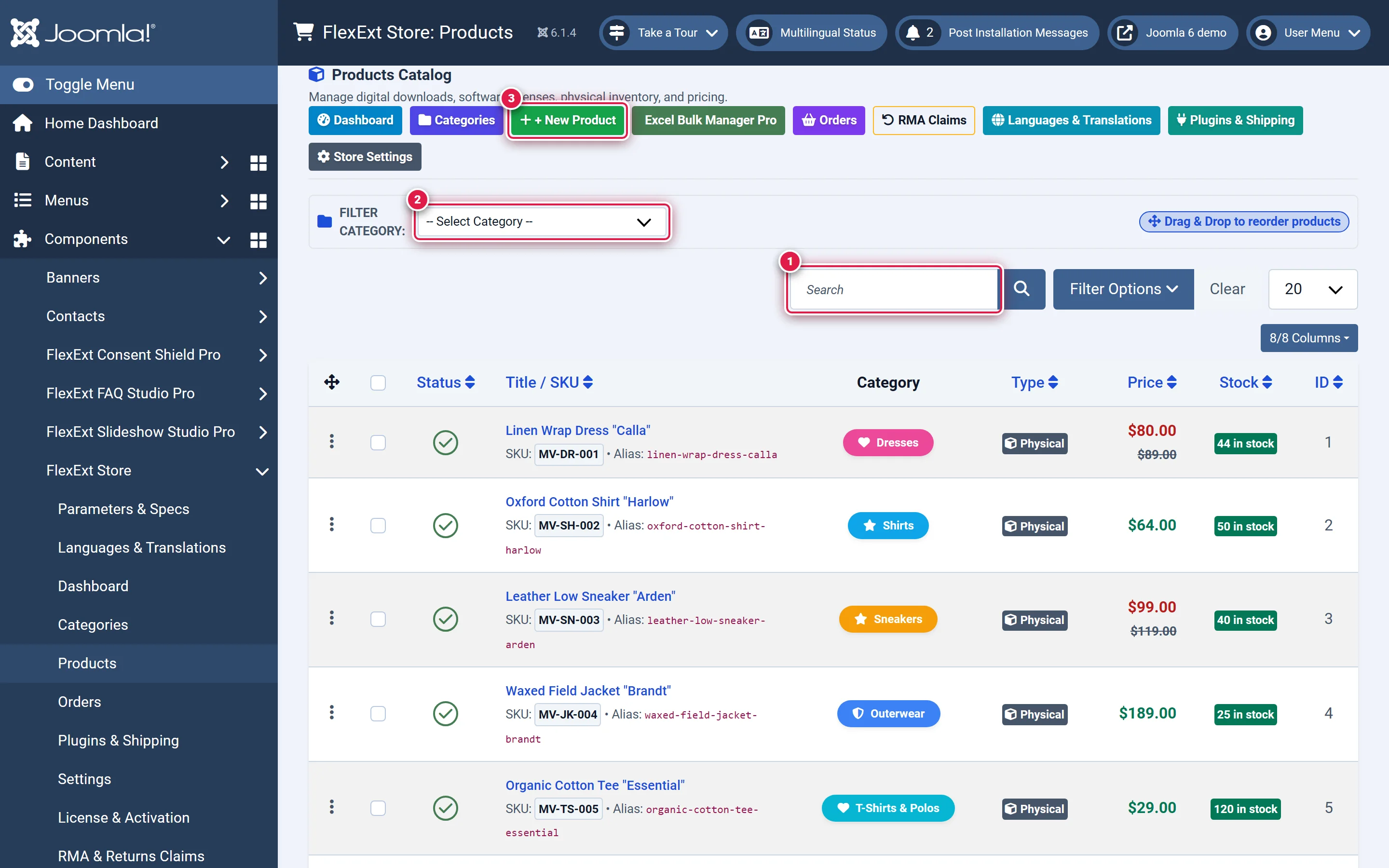
Interface Guide & Numbered Badges
- 1 — Search by Title or SKU: Free-text search input to query products instantly across catalog records (
input#filter_search). - 2 — Filter Category: Taxonomy dropdown menu to filter displayed rows by primary category (
select[name="filter_category_id"]). - 3 — + New Product: Primary action button to create a new product and open the Product Editor (
a.flx-admin-btn-newprod).
4. Next Steps
- Explore the Products List Guide to understand list management, search tools, and bulk spreadsheet operations.
- Proceed to Tab 1: General Info to begin configuring product records.