Parameters & Specifications Studio Pro All Editions
The Parameters & Specifications Studio Pro provides a centralized, reusable technical attribute engine for FlexExt Store. Instead of typing repetitive technical specs into free-form text areas on each individual product, store administrators define global parameters once—complete with data types, measurement units, group categories, and multilingual labels—and then quickly assign values across the catalog. In Pro and Ultimate editions, these specifications power high-speed, instant storefront faceted filtering.
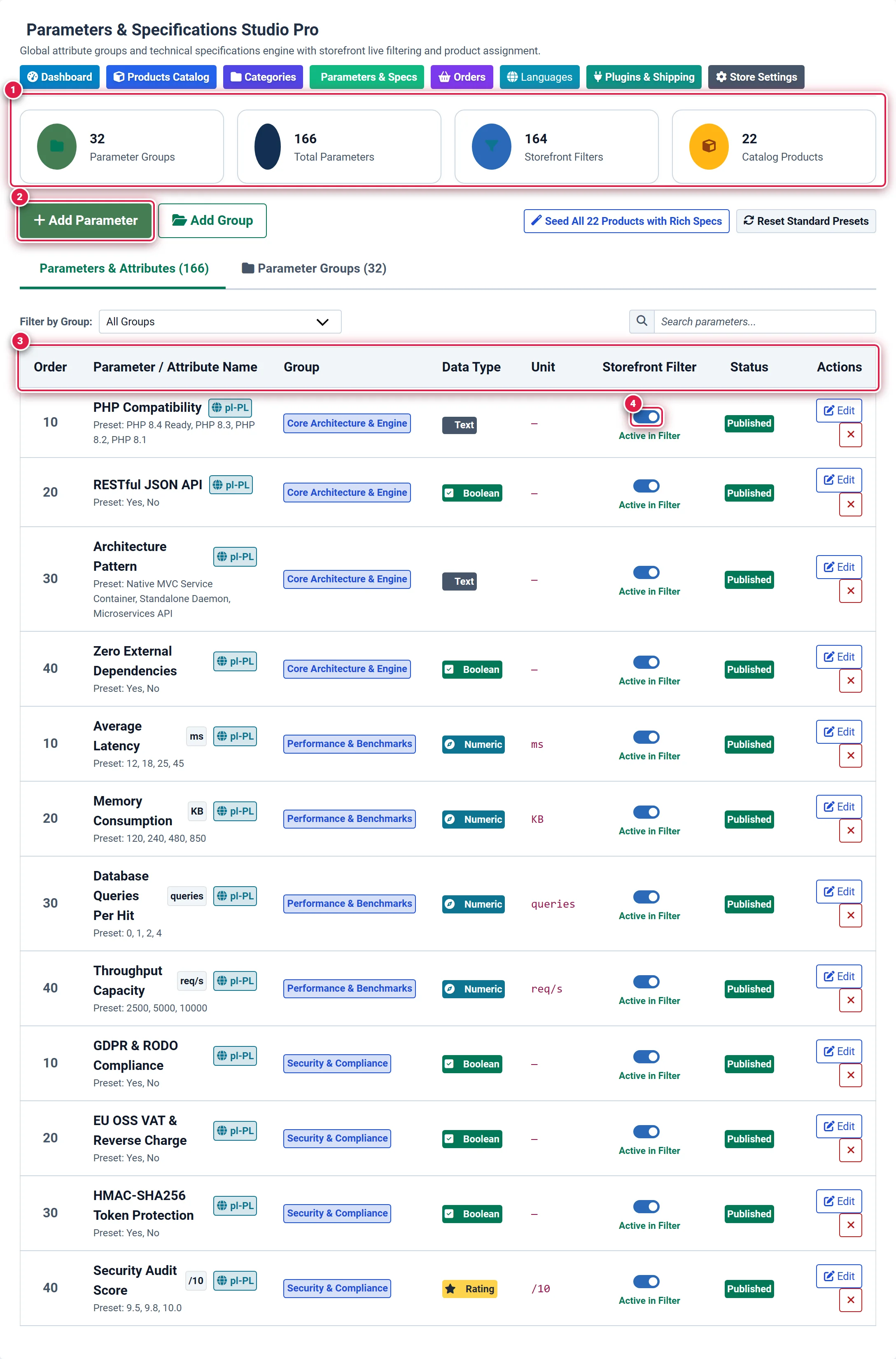
- Badge 1 — Real-Time Specifications & Filter KPI Cards: Displays total defined parameter groups, total technical attributes in the library, active storefront faceted filters, and total catalog products.
- Badge 2 — Global Attribute Definition Trigger (+ Add Parameter): Opens the specification modal to register a new parameter with title, data type, unit, and default preset options.
- Badge 3 — Technical Specifications Registry Table: Master table showing parameter sort order, multilingual titles, assigned group, formatted type badge, measurement unit, filter status, publication state, and quick edit actions.
- Badge 4 — Live Storefront Faceted Filter Toggle Switch: Interactive AJAX toggle enabling or disabling instant faceted filtering for that specific attribute in catalog category views.
4 Commercial Editions Capability Matrix
Parameters & Specifications Studio scales transparently across all 4 commercial tiers:
| Specification Capability | Basic Starter ($0) | Standard Growth ($39) | Pro Commercial ($79) | Ultimate Enterprise ($199) |
|---|---|---|---|---|
| Global Parameters Library | Up to 10 specs | Unlimited | Unlimited | Unlimited |
| Max Parameters per Product | Up to 5 specs | Unlimited | Unlimited | Unlimited |
| Supported Data Types | Text, Numeric, Boolean | Text, Numeric, Boolean, Rating, Pills | All 5 Types + Presets | All Types + Custom Icons |
| Attribute Groups Hierarchy | Unlimited Groups | Unlimited Groups | Unlimited Groups | Unlimited + Multi-level |
| Storefront Faceted Live Filter | — | — | Included (Instant AJAX) | Included (Instant AJAX + Multi-select) |
Multilingual Labels (title_l10n) | English / Polish default | English / Polish default | Full Language Array | Full Language Array + Auto-fallback |
| One-Click Seeder & Presets | Manual creation | Presets Reset | Seeder + Presets Wizard | Seeder + Presets Wizard |
Stores starting on the Basic Edition can define up to 10 global specifications and assign up to 5 specs per product. Upgrading to Standard ($39) removes all library and per-product quantity limits. Upgrading to Pro ($79) unlocks the interactive Storefront Faceted Filter widget (#flxFacetFilterWidget), allowing customers to filter search results by technical specifications in real time.
Where to Find It
Access the studio from the Joomla Administrator navigation:
Components → FlexExt Store → Parameters & Specs
Direct URL: administrator/index.php?option=com_flexext_store&view=parameters
Parameter Groups Architecture (Figure 2)
Technical attributes are logically organized into Parameter Groups (e.g. Core Architecture, Connectivity & Ports, Physical Dimensions, Environmental & Compliance). In the customer-facing storefront product details view, these groups render as neatly organized accordion sections or tabbed spec tables.
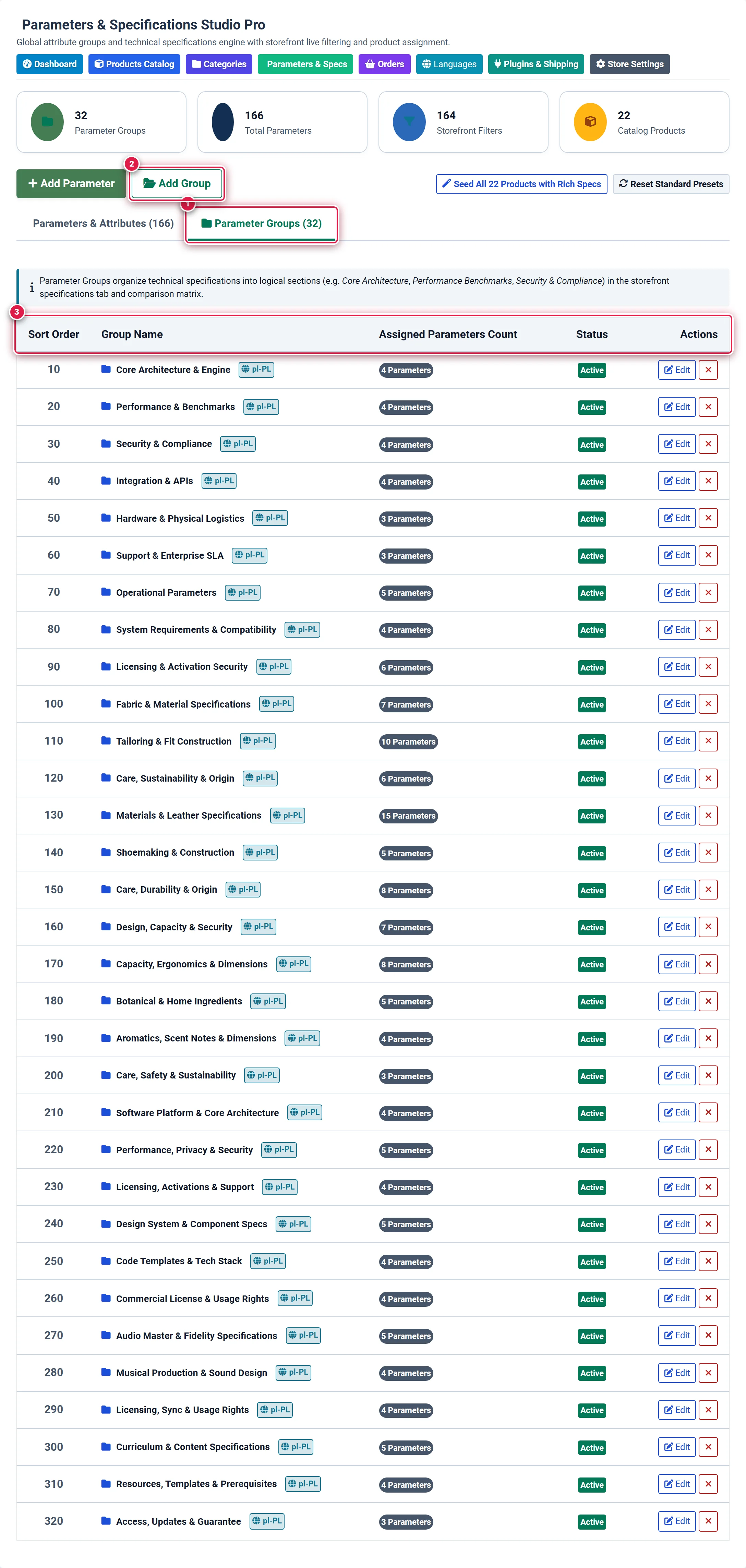
- Badge 1 — Parameter Groups Navigation Tab: Switches between the flat attribute specification ledger and the category grouping architecture.
- Badge 2 — + Add Group Modal Trigger: Launches the modal dialog to create a new specification category with multilingual labels and display sorting.
- Badge 3 — Attribute Groups Hierarchy & Assigned Parameter Counter: Lists existing groups with their sort priority, localized title badges, and live counter showing how many active parameters belong to each group.
Technical Data Types & Measurement Units
FlexExt Store supports five specialized data types engineered for precision display and efficient database indexing:
1. text (Freeform Text)
- Purpose: Generic strings, model codes, chipset revisions, or manufacturer notes.
- Example:
AMD Zen 5 (Granite Ridge)orPCI Express 5.0 x16. - Filtering Behavior: Displays as a checkbox or dropdown selection on storefront facet filters.
2. numeric (Numeric with Measurement Unit)
- Purpose: Quantitative technical benchmarks with dedicated unit symbols.
- Supported Units: Any custom symbol or standard unit string (e.g.
GHz,MB,W,mm,kg,ms,%,V). - Storefront Display: Formatted with monospace typography and unit badges:
4.5 GHz,65 W. - Filtering Behavior: In Pro and Ultimate, numeric parameters support range sliders and min/max inputs on storefront category views.
3. boolean (Binary Switch / Feature Flag)
- Purpose: Hardware or software capability availability flags (True / False).
- Storefront Display: Renders as a green checkmark (
Yes) or subtle dash (No). - Example:
ECC Memory Supported: Yes,Waterproof IP68: Yes,Hot-Swap Bays: Yes. - Filtering Behavior: Storefront customers can check a single box to isolate products offering this feature.
4. rating (Score & Evaluation)
- Purpose: Benchmark ratings, energy efficiency tiers, or noise level rankings.
- Storefront Display: Visual 1-to-5 star badges or score meters (e.g.
4.8 / 5.0).
5. pills (Multi-Tag Presets)
- Purpose: Attributes with multiple selectable tags separated by commas.
- Storefront Display: Renders as sleek colored pill badges (e.g.
[HDMI 2.1] [DisplayPort 2.0] [USB-C Alt Mode]).
Two-Tier Specifications Workflow
FlexExt Store implements a clean separation between Global Attribute Definitions and Per-Product Value Assignments:
+--------------------------------------------------------------+
| Step 1: Parameters Studio (view=parameters)                 |
| - Define parameter title (e.g. "Clock Speed")               |
| - Assign data type (e.g. "numeric") and unit (e.g. "GHz")    |
| - Assign to Group (e.g. "Core Architecture")                 |
| - Set storefront filter visibility (is_filter = 1)          |
+------------------------------+-------------------------------+
                               | Reusable across catalog
                               v
+--------------------------------------------------------------+
| Step 2: Product Edit View (view=product&layout=edit#tab-params) |
| - Open product editor -> Technical Specs tab                 |
| - Select defined parameter from dropdown                     |
| - Input specific value (e.g. "5.7")                          |
| - Value renders on Storefront product specifications tab     |
+--------------------------------------------------------------+
To learn how to assign and customize specifications on individual catalog items, see the dedicated Product Technical Specifications Guide.
Storefront Live Faceted Filter Integration All Editions
In Pro Commercial ($79) and Ultimate Enterprise ($199) editions, toggling the Storefront Filter switch (is_filter = 1) on any parameter immediately activates it in the storefront faceted search engine:
- Zero Configuration: No complex module mapping is required. The moment a parameter is marked active, the category catalog page (
index.php?option=com_flexext_store&view=products) renders dynamic facet controls in the sidebar. - Real-Time Ajax Execution: When a customer clicks a checkbox or adjusts a numeric range, the catalog updates instantly without a full page reload.
- Adaptive Product Counts: Every facet option displays an active count of matching products (e.g.
DDR5 (14)). Options with zero matching items are automatically disabled to prevent dead-end searches. - URL Hash Synchronization: Filter states are synchronized with the browser history URL, enabling customers to bookmark or share exact filtered result sets.
Seed Utilities & Rapid Setup
To accelerate store configuration and provide instant demo data, the toolbar provides two automated wizards:
- Seed All Products with Rich Specs (
task=parameters.seedAllProducts): Scans all catalog products and assigns realistic, categorized specifications tailored to their product type. Ideal for testing storefront spec tabs and faceted filters. - Reset Standard Presets (
task=parameters.seedPreset): Resets the global parameters library to factory presets, recreating standard hardware, software, and apparel attribute groups with preconfigured units.
Related Documentation
- Product Technical Specifications Assignment — Assigning and overriding spec values per product.
- Categories Management Studio — Organizing catalog hierarchy and category-level facet layouts.
- Store Settings Hub — Configuring default store behavior and display options.
- 4-Tier Edition Comparison Matrix — Full feature breakdown for Basic, Standard, Pro, and Ultimate.